
Perfect Match
Return was completed exactly as the customer described with no issues.
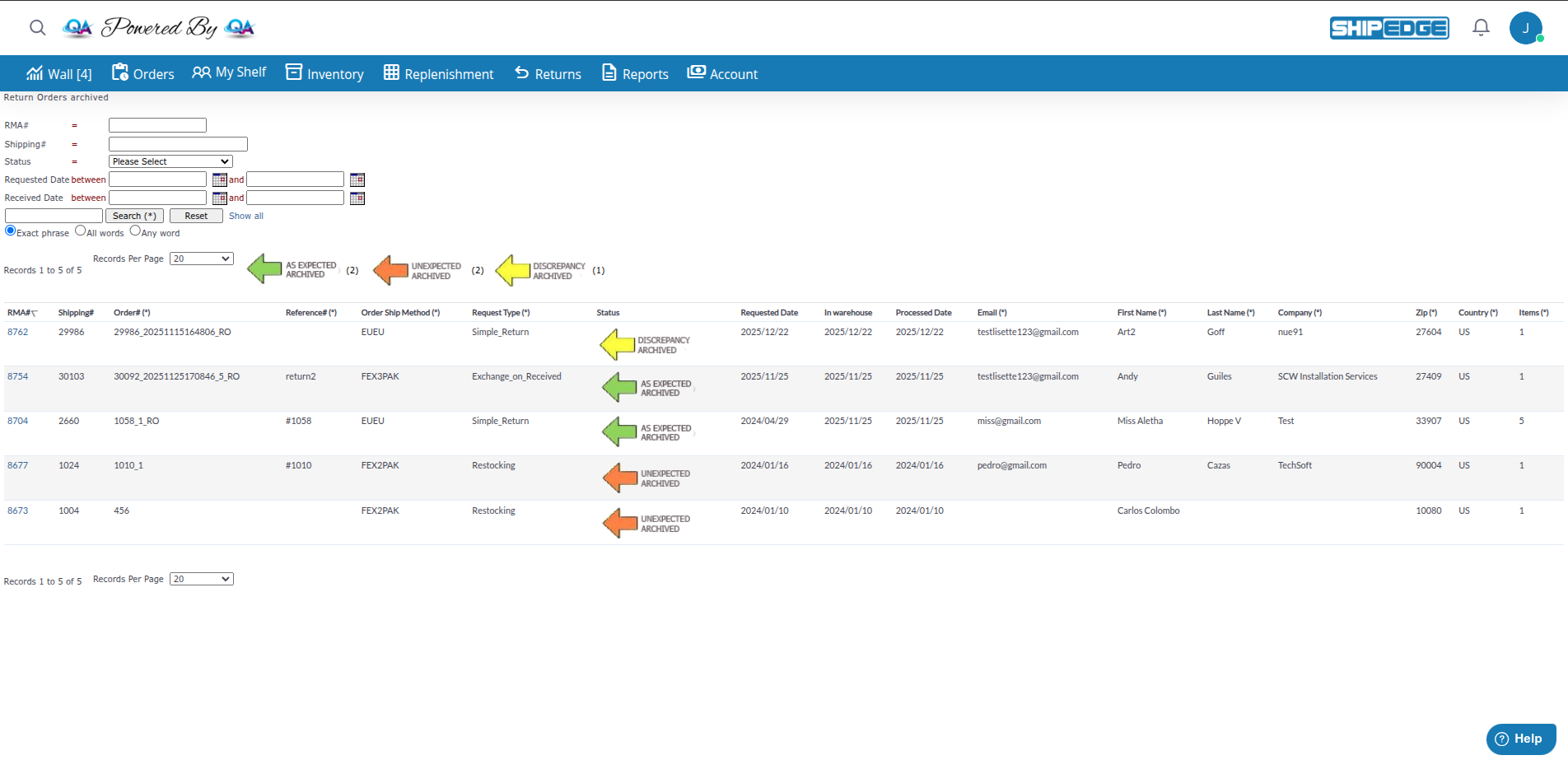
Archived Returns are completed return orders that have been processed and moved to historical records. Once a return is fully completed (items received, inspected, and finalized), it can be archived to keep your active returns list clean while maintaining a complete history of all returns.
Archived returns provide a permanent record for audits, customer service inquiries, and historical reporting without cluttering your active workflow.
Keep your active returns view focused on items that need attention by moving completed returns to archive.
Maintain a permanent record of all return transactions for auditing and compliance.
Quickly look up past returns when customers have questions about previous transactions.
Analyze historical return data to identify trends, problem products, or seasonal patterns.
Returns are archived automatically or manually once they reach completion:
When a return reaches these completion states, it becomes eligible for archiving:
| Active State | Description | Archived Description |
|---|---|---|
| AS EXPECTED | All items received as seller expected | AS EXPECTED ARCHIVED |
| DISCREPANCY | Quantity or condition differences found | DISCREPANCY ARCHIVED |
| INCOMPLETE | Some expected items not received | INCOMPLETE ARCHIVED |
| UNEXPECTED | Received unexpected SKUs | UNEXPECTED ARCHIVED |
System administrators can archive returns:
Access the Archived Returns View
Navigate to Returns menu and click “Return Orders Archived” from the active returns list.
View the Archived Returns List
You’ll see a table displaying all archived returns for your account with these columns:
Use Search Filters
Find specific archived returns using these search fields:
View Return Details
Click on any RMA# to view the complete return details including:
Sort and Filter Results
Perfect Match
Return was completed exactly as the customer described with no issues.
What it means:
Best For: Standard returns where everything went smoothly.
Differences Found
Return was completed but with differences between expected and actual items.
What it means:
Common Causes:
Action Required: Review discrepancy details. May need to contact customer about differences.
Surprise Items
Return included items that weren’t part of the original return request.
What it means:
Common Causes:
Action Required: Determine ownership of unexpected items. May need to create new return or contact customer.
Shows: Only your account’s archived returns (filtered by AcountID)
States Visible: AS EXPECTED ARCHIVED, DISCREPANCY ARCHIVED, INCOMPLETE ARCHIVED, UNEXPECTED ARCHIVED
Purpose: View your historical returns for reference, customer service, and reporting.
Periodically review archived returns to ensure accuracy and complete any outstanding follow-ups before final archiving.
Add detailed comments to returns before archiving so future reference is clear and complete.
Contact customers about discrepancies before archiving so issues are resolved, not just recorded.
Ensure exchanges are properly linked to returns before archiving for complete audit trails.
Review archived returns quarterly to identify recurring issues, problem products, or process improvements.
Can't Find an Old Return
Cause: Return might still be in active view or search filters are too narrow.
Solution:
Return Shows Wrong Status
Cause: Return status may have been updated after archiving or during account closure.
Solution:
Missing Return Data
Cause: Return may have been created before certain fields were added or data was incomplete.
Solution:
Next Steps: Archived returns are permanent records. Use the archived returns list to analyze trends and improve your return processes.